

Get views, likes, followers, and comments on your Rumble videos.
With your CryptoElite account connected, open it in a new tab using this link: https://cryptoelite.top/tasks and click "Create Task" - in "Task Name", type: Follow and Watch - in "Task Description", type: Follow and Watch - Like and Comment - in "Task Instructions", type the following template:
Open this link in a new tab: "Insert your Rumble registration link here" - If you don't already have an account, register with your email and password and open this link in a new tab: "Insert your Rumble channel link here" - Follow the channel, choose any video, watch it for at least 1 minute, click "Like" and leave a positive comment. After logging in, you can like and comment on any video from the second link above once a day. After completing the task, in "Proofs": enter your Rumble username and your CryptoElite username to confirm the task, and below, take a screenshot and submit it. Verification will be done within 12 to 24 hours and you will receive your reward.
Copy the task template above and include the necessary links from your Rumble account following the path below:
Your Rumble registration link can be found here:
Open this link in a new tab => https://rumble.com/account/referral
Your channel link can be found here:
Open this link in a new tab => https://rumble.com/account/channel/listing - choose the channel you want to promote and where you focus your videos, copy your channel link and paste it into the task template above.
It is important that you save the task as soon as you complete it, otherwise it will be lost and you will have to do everything again. To do this, click the blue "SAVE" button to save the task.
In "Task Category", choose: Social Media Engagement.
In "Maximum Completions", enter: 1000
This means this task will be completed 1,000 times.
In "Reward (Coins)", enter: 5000
This means 5000 coins will be debited from your purchase balance, and the Cryptoelite user will receive 5000 coins in their main balance if the task is successfully completed after verification. Note that the amount of COINS you pay the user who completes the task is at your discretion; the higher the amount, the greater the chances of the user completing the task, but 5000 coins is already a considerable amount. 5000 COINS equate to US$0.01 per dollar for the user, which will be deducted from the advertiser's (your) purchase balance. To calculate how much you want to pay the user to complete the task, click the link, open this link in a new tab: https://cryptoelite.top/blog and scroll to the bottom of the page; you will find a calculator. Convert COINS to dollars and vice versa.
"Maximum approval time (hours)" is the maximum time you will have to review the user's task and approve it. We recommend a maximum of 12 hours, but you can choose what is most convenient. To do this, simply drag the bar to the right and select the desired time.
"Interval" indicates how many times the user can perform this task. We recommend a maximum of once a day, as the same user repeatedly performing the task may generate spam or automation practices on your Rumble account, which can harm you. To do this, simply drag the bar to the right and select 1 day.
After completing all the steps, you will find the total value of your task in COINS. If you have available balance, simply click the blue button: "Submit for review". Please let us know about the verification of your task via our Telegram support, open this link in a new tab: https://t.me/CryptoElitePTC - including your CryptoElite username and the task name. Within 12 hours, we will review your request and, if everything is correct, it will be approved so you can start receiving interaction and engagement from CryptoElite users on your Rumble videos.
Task Approval
In the "Tasks" mode, it is highly recommended that you check once a day if any user has completed any tasks. To do this, open the link below in a new tab and follow steps 1 and 2.
Open this link in a new tab - Image1 - https://img.cryptoelite.top/Cryptoelite/Task1.jpg
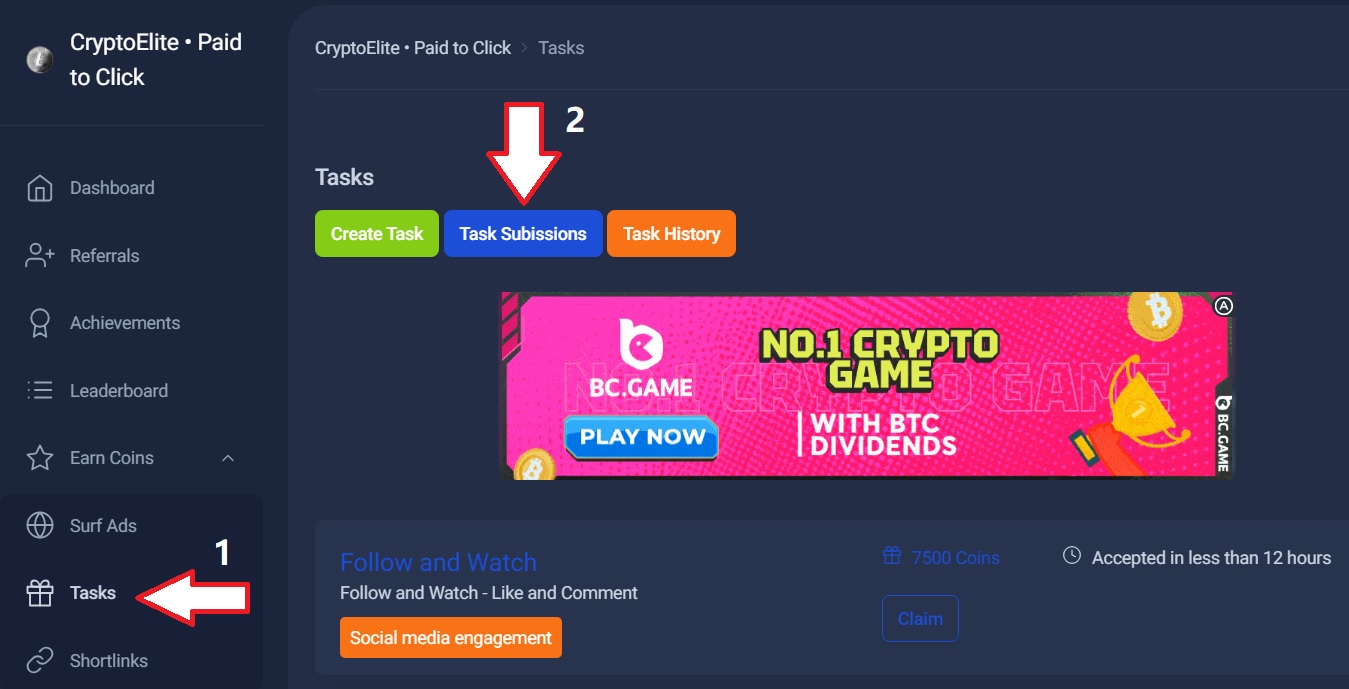
Then open the link below in a new tab and follow the instructions.
Open this link in a new tab - Image2 - https://img.cryptoelite.top/Cryptoelite/Task2.jpg
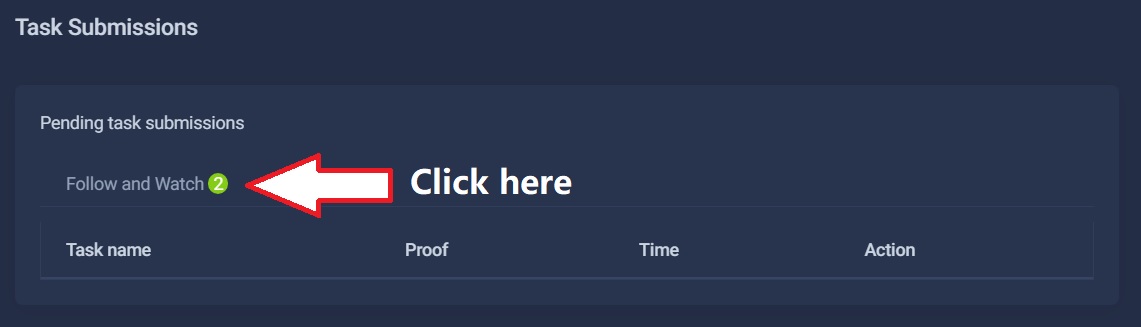
Again, open the link below in a new tab and follow the instructions.
Open this link in a new tab - Image3 - https://img.cryptoelite.top/Cryptoelite/Task3.jpg
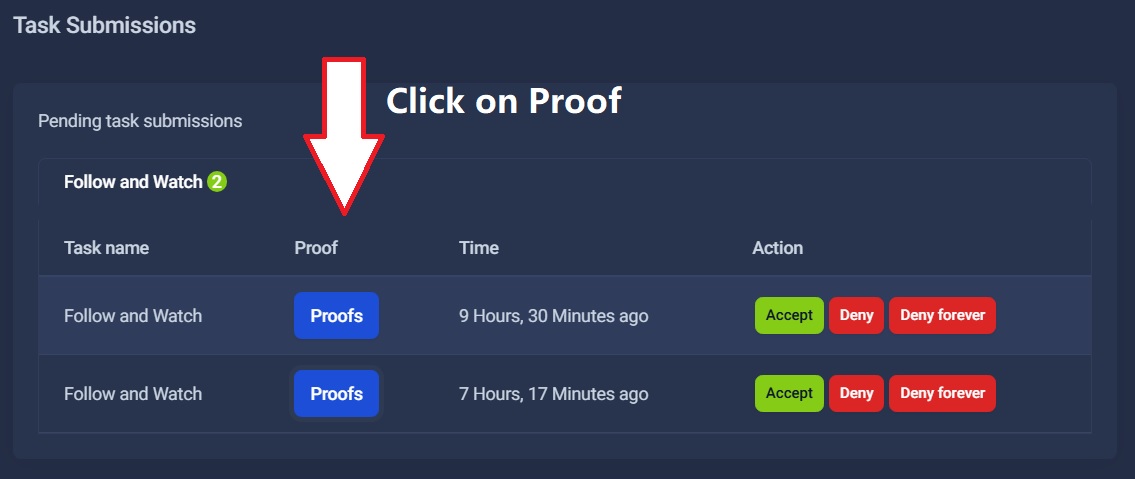
In the image below, you'll see a screenshot from a CryptoElite user showing the completed task. Here's a tip: it's not mandatory for the user to follow all the requirements of your task. If they do, you'll never get engagement on your channel. Simply play the video for a few seconds, like it, leave a comment, or follow your channel. This already puts you in profit, especially since their reward is minimal for the action they took, which will bring you great long-term results in growing your channel. Think wisely; the important thing is conversion, regardless of what kind it is.
Open this link in a new tab - Image4 - https://img.cryptoelite.top/Cryptoelite/Task4.jpg
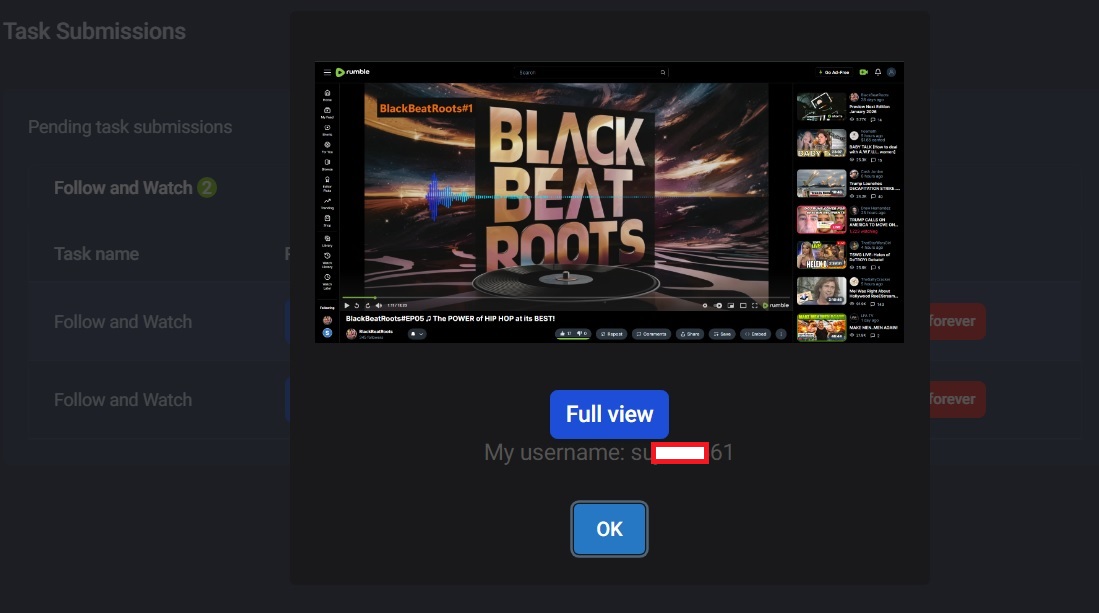
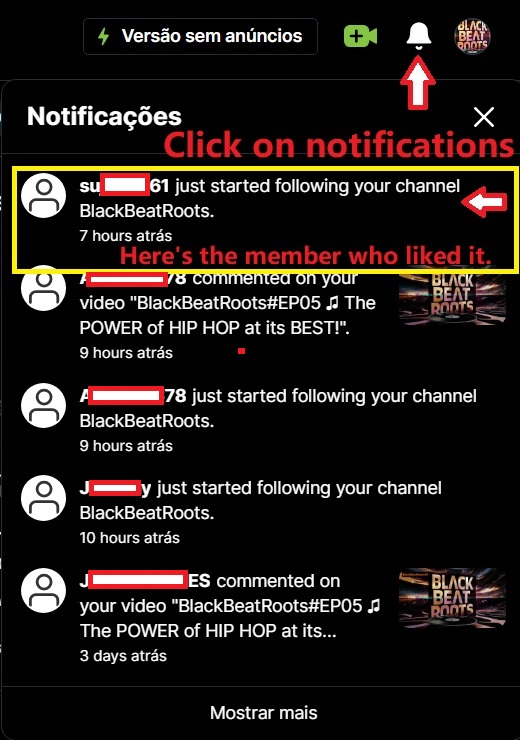
Go to your Rumble account and check your notifications as shown in the image below. Note that the same username appears in image 4, marked with a yellow square. This indicates that the user followed the channel and thus the task was successfully completed. Important: the user who completed the task may have two different usernames, one for CryptoElite and another for Rumble. Pay attention to this, as the user knows they need to justify this when submitting evidence to prove they completed the task.
Open this link in a new tab - Image5 - https://img.cryptoelite.top/Cryptoelite/Task5.jpg
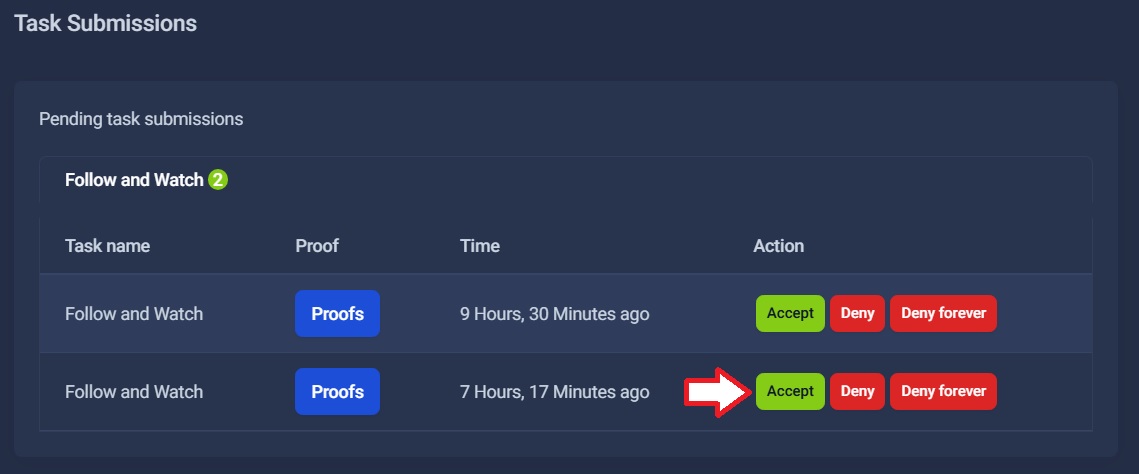
Finally, as shown in the image below, if you analyzed that the screenshot in image 4 showed no interaction from the CryptoElite user in relation to your task, or is another screenshot unrelated to your task request, simply click the red "DENY" button. The task will be canceled, the user will not be rewarded, and nothing will be deducted from the advertiser's (your) purchase balance. However, if everything is correct, simply click the green "ACCEPT" button, and the user will receive their reward, the amount will be debited from your purchase balance, and the task will be successfully completed.
Open this link in a new tab - Image6 - https://img.cryptoelite.top/Cryptoelite/Task6.jpg
Experience how CryptoElite can help your Rumble channel reach more real viewers around the world.